GolfCourseCentralBY MEA · IT STRATEGY & MODERNIZATION
Menu

A clearer day for your course

Every day.
Every tee time.
One clear view.

Bring tee times, recurring leagues, outings and cart readiness into one connected staff workspace.

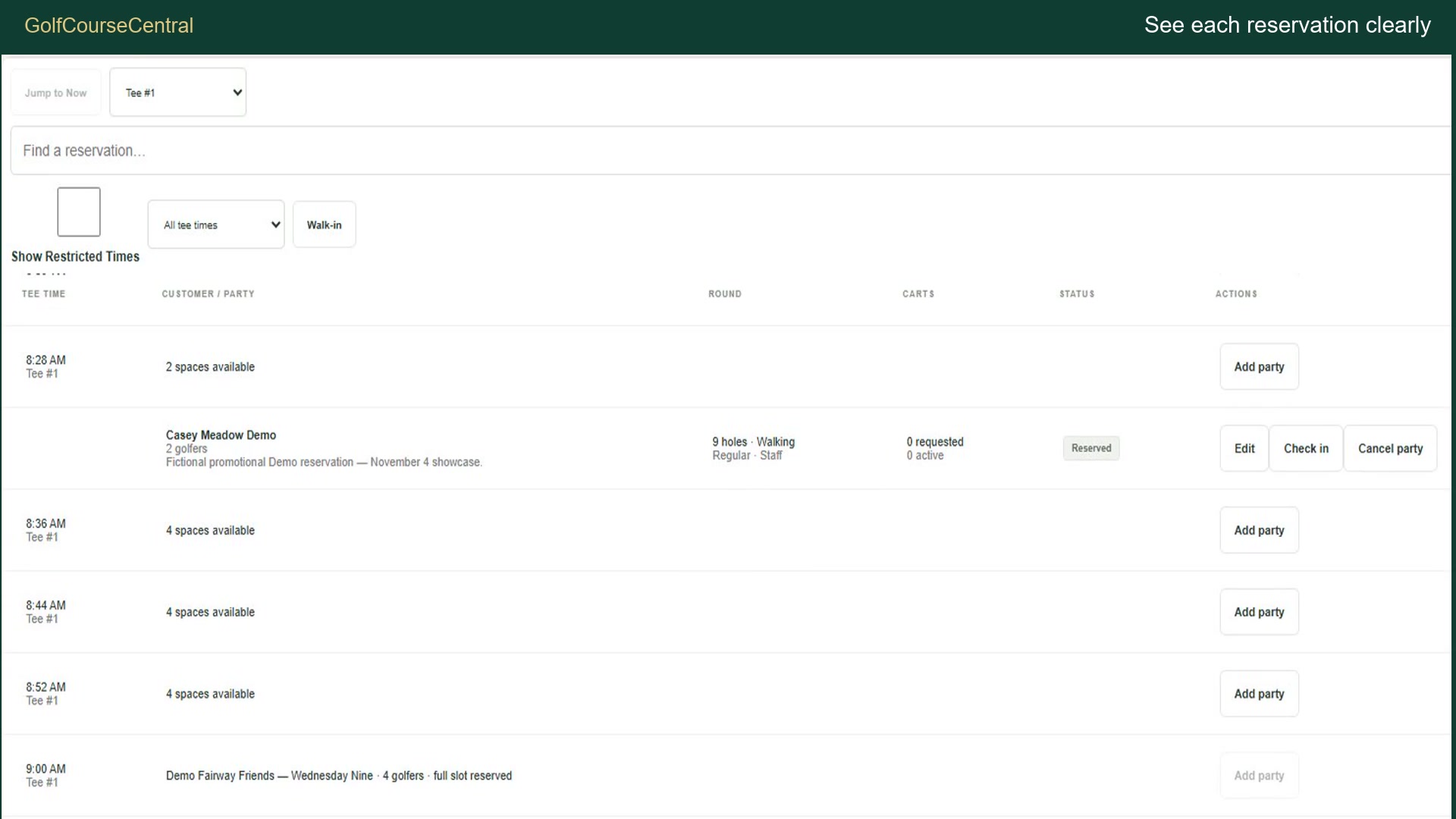
Fictional Demo Tee Sheet showing scheduled groups and round preferencesView larger ↗
Real application footage. Fictional demonstration data.
Tee Sheet & reservationsLeagues & outingsCart readinessStaff access & training

A closer look

Every day.
Every tee time.

Follow a fictional operating day, from the first reservation to the final fleet review. See the supported workflows in action.

1 minute 31 seconds · English captions available · Fictional GCC Demo environment

Read the video transcript

GolfCourseCentral Promotional Advertisement — approved narration

Kokoro af_heart / speed 0.95 / approved pronunciation rules

GolfCourseCentral brings your daily golf-course operations into one clear, connected workspace.

Start with a Tee Sheet that makes the day easy to follow. Review party sizes, nine- or eighteen-hole rounds, and walking or riding preferences. See reservations alongside reserved league capacity, so your team can understand what is scheduled before the next group arrives.

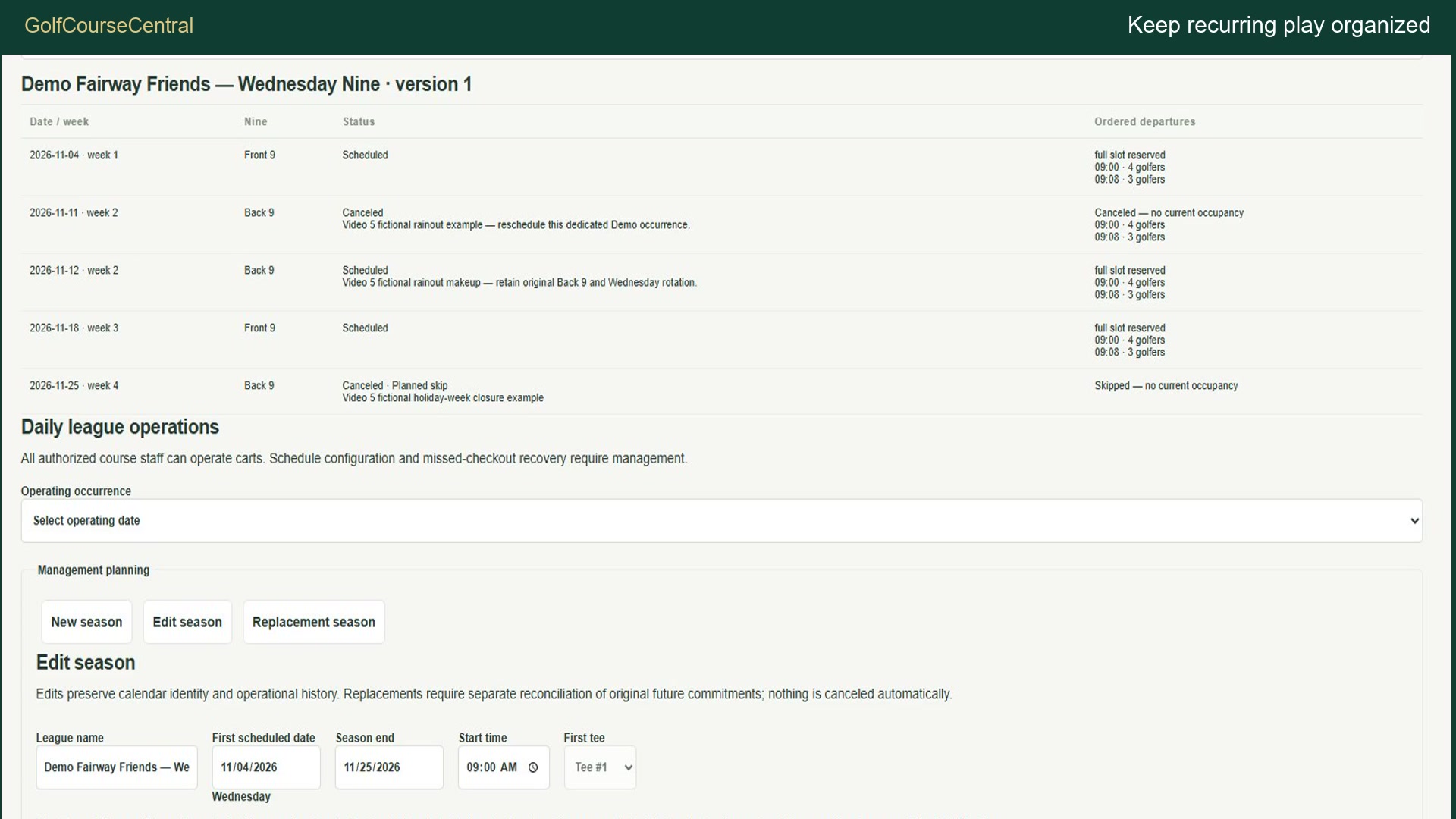
Keep recurring leagues organized with scheduled departures and alternating front and back nines. Review rainouts and makeup dates, then verify the saved changes on the Tee Sheet. The schedule and its history stay available for your next conversation.

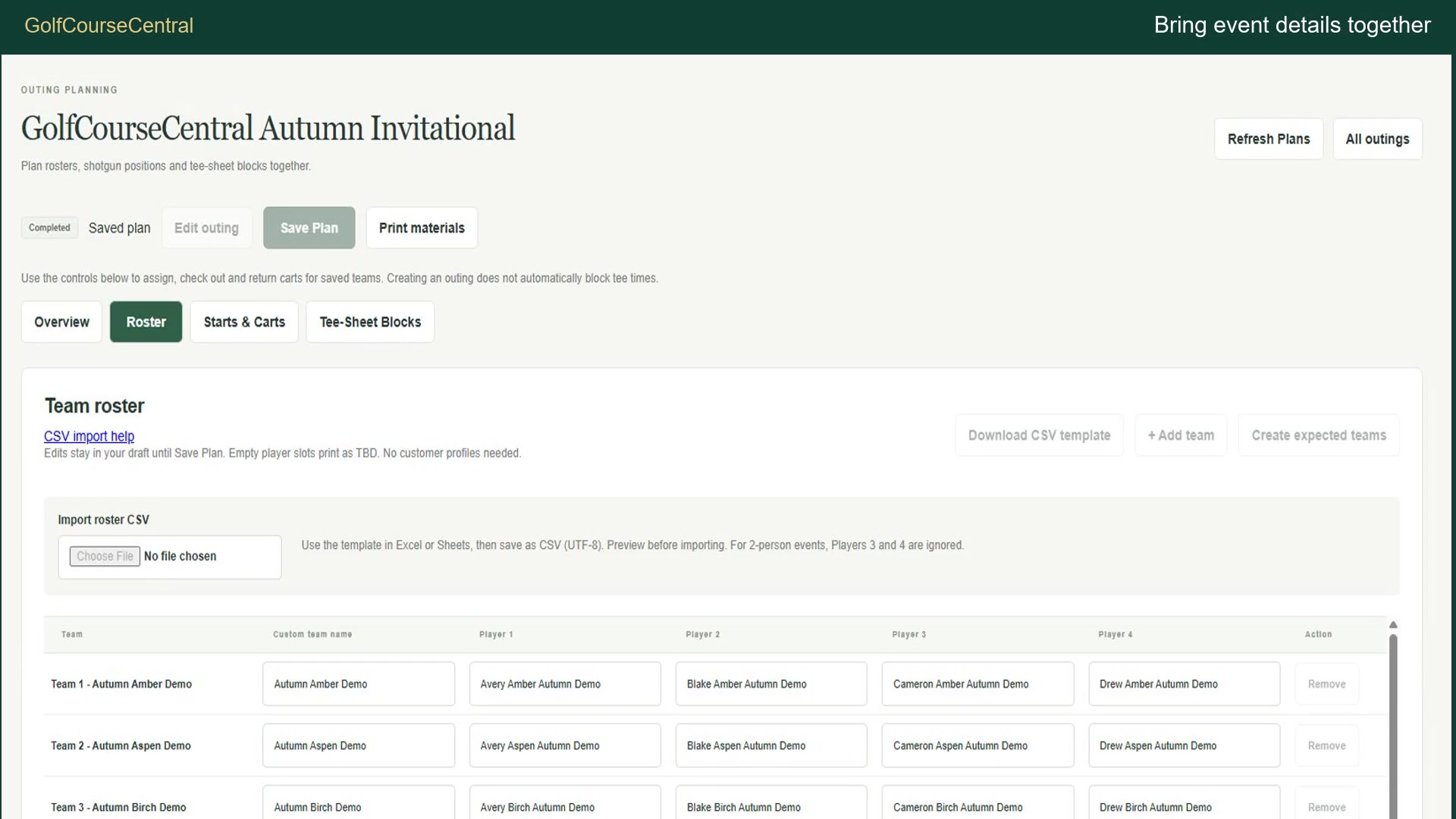
Bring outing details together, from participant lists to starting positions and cart planning. Revisit a completed event like the Autumn Invitational, with its saved records available when staff need to understand what happened.

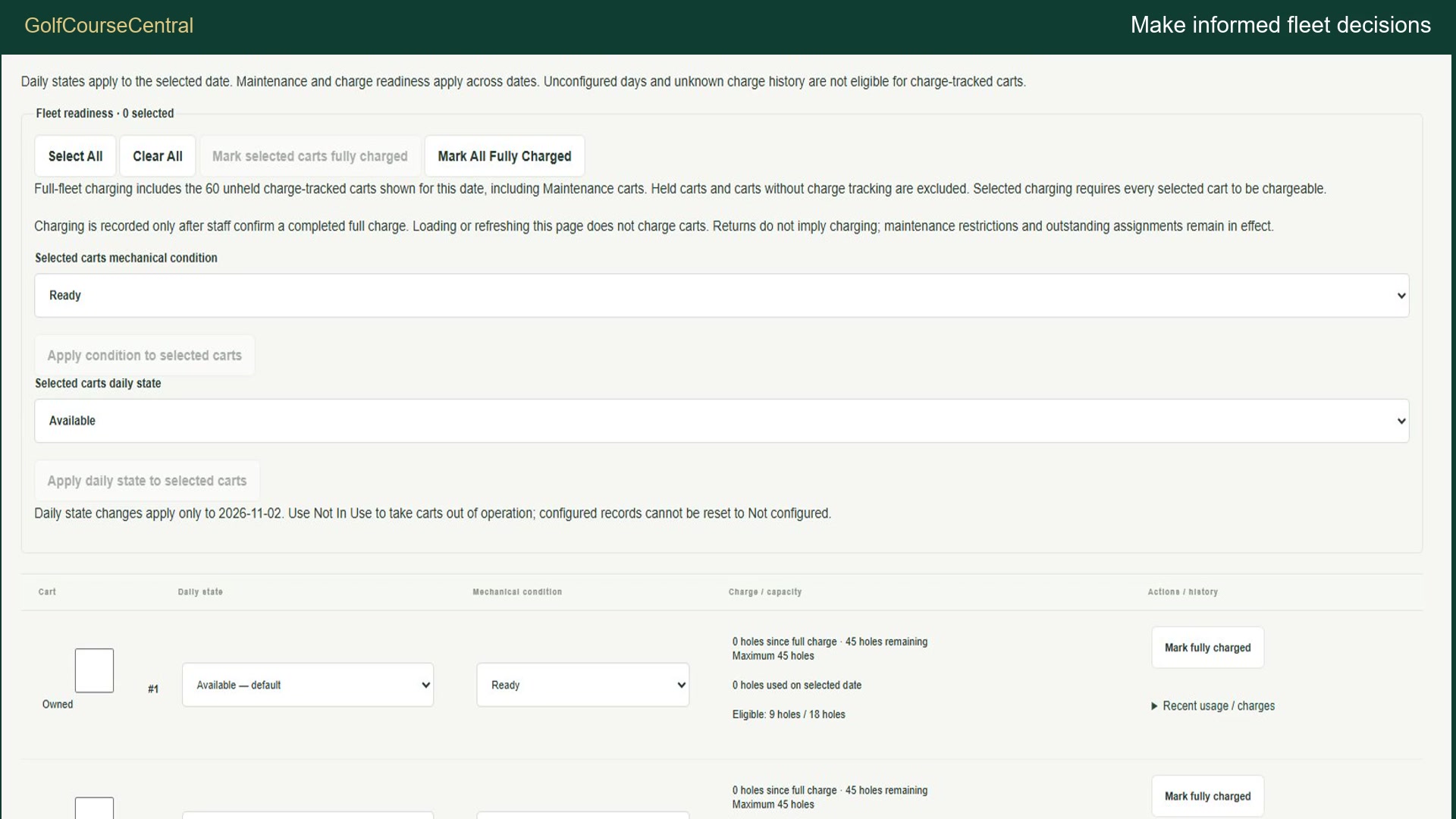
Review fleet availability and daily readiness in the same workspace. Staff verify charging separately from returns. Outstanding assignments stay visible until resolved, while cart eligibility reflects recorded usage, charge capacity, and operational restrictions. Clear status helps staff make informed decisions.

From the first reservation to the final fleet review, give your team a clearer view of the day. Discover GolfCourseCentral. Request a demonstration from MEA - IT Strategy and Modernization.

Keep the day connected

From the first tee
to the last return.

Give your team a shared view of what is scheduled, who is playing and which carts are ready.

01 / Plan the course

Make room for recurring play.

Review party sizes and round preferences on the Tee Sheet. Schedule recurring league dates, rotate front and back nines, and manage supported rainout and makeup changes with linked Tee Sheet blocks.

Fictional Fairway Friends league schedule with alternating ninesView larger ↗
League scheduling · Fictional Demo example
02 / Coordinate the event

Keep outing details together.

Bring golfer rosters, starting positions and numbered cart assignments into the outing workflow. Retain completed events and their history for later reference.

Completed fictional Autumn Invitational outing and starting positionsView larger ↗
Outing management · Fictional Demo example
03 / Know the fleet

Readiness that reflects the record.

Review outstanding assignments and daily readiness. Record verified returns and usage, then confirm charging separately. Eligibility reflects recorded capacity and operational restrictions; unresolved holds remain protected.

Demo fleet readiness and calculated cart eligibilityView larger ↗
Fleet readiness · Fictional Demo example

Built from a real operating need

It started
with paper.

GolfCourseCentral originated from a local golf course’s paper-based processes.

Tee times were organized on handwritten Tee Sheet calendars. Cart assignments and holes played were recorded on paper. League schedules were coordinated manually, while outing details lived in spreadsheets and Word documents.

Those familiar tools provided the starting point for MEA’s custom application modernization approach: understand the work, map the handoffs, and build around the decisions staff need to make.

The goal was to bring connected tasks into one place while preserving the details that matter—from scheduled play to cart usage and assignment history.

Today, GolfCourseCentral brings those supported workflows into a connected staff workspace—with role-based access, preserved history and training close at hand.
Created by MEA — IT Strategy & Modernization.
Product images and the demonstration film use fictional data.

Designed for the daily work

Less paperwork.
More time for your course.

GolfCourseCentral is designed to help staff spend less effort piecing information together and more attention on the day ahead.

A shared view of the day

Keep reservations and reserved league capacity visible together, so staff can review the schedule in one workspace.

Fewer scattered details

Bring outing rosters, starting positions and cart planning together instead of searching across separate working documents.

Clearer operational decisions

Review recorded usage, charge capacity and unresolved holds before deciding which carts are ready.

These are intended operational benefits, not measured savings or customer adoption results.

Built around your course

Your Course.
Your Operations.
Your GolfCourseCentral.

Start with the supported workflows. Shape the setup around your daily operation. When you need something beyond the standard product, MEA can assess it as a separate development project.

01 / Standard configuration

Make the existing tools work for you.

Set up supported operating hours, league schedules, cart records and staff roles using the application’s existing controls. We review your requirements together and confirm which settings the current product supports.

Configuration uses existing functionality. Onboarding scope and assistance are agreed before work begins.

02 / Custom enhancements

Plan what comes next.

Need a different workflow, a new integration or a specialized view? MEA can evaluate feasibility and propose a defined scope, estimate and delivery plan.

Custom development is quoted separately. New features are subject to agreement, testing and release approval—not included automatically with standard configuration.

Discuss your course ↗

Support the people running the day

The right access.
Clear guidance.

Role-based staff access

Administrator, Course Manager and Staff permissions support different responsibilities. Account administration stays within authorized controls.

Help in the workflow

Written Help and seven training videos cover everyday operations, with captions and playback controls.

Explore GolfCourseCentral

Start with your
operating day.

See how the workflows could fit your course. Request a guided demonstration from MEA — IT Strategy & Modernization.

Application screenshot

Fictional Demo data. Open the original image for full-size viewing and device zoom.

Open original image ↗